Why Cable Management Matters for Productivity and Performance
Loose cables do more than create visual clutter — they interfere with the overall function of a workspace. Tangled wires can get caught, disconnected, or damaged, interrupting workflow and creating unnecessary friction throughout the day.
A well-managed cable system supports a cleaner, safer, and more efficient workspace, allowing users to focus on their work without distraction.
Types of Cable Management
Effective cable management typically involves a combination of horizontal and vertical solutions:
- Horizontal cable managers run cables along the underside of your worksurface, keeping them hidden and organized across the desk.
- Vertical cable managers guide cables from the desk down to the power source, keeping them bundled and controlled.
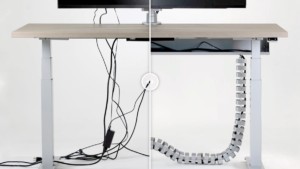
Using both together helps maintain a clean setup from the worksurface to the outlet, such as a cable trough paired with a vertical cable manager (e.g., a cable chain). Additional tools including cable ties, clips, or sleeves can be added to organize smaller sections or secure loose wires.
Setting Up a Clean System
If cables have become disorganized, the most effective approach is to start fresh. Start by unplugging equipment and removing any existing cable setup. From there, rebuild with the appropriate cable management solutions based on the workspace and equipment being used.
Install horizontal and vertical management components first, then reconnect devices in a structured way, starting with fixed equipment and working toward items that require more flexibility. This helps prevent cables from crossing, tangling, or becoming difficult to access over time.
Pro Tip: Make sure your cable management solutions are properly sized for your workspace. Horizontal systems like a Wire Way can be cut to fit your worksurface, while vertical cable managers such as cable chains can be adjusted to match the distance to your power source for a clean, precise setup.
Allow for Movement
Cable management should support movement, not restrict it. Leave enough slack in cords for any equipment that needs to move, such as monitors, phones, or sit-stand desks.
Excess cable can be neatly stored within a cable trough or management system, allowing equipment to adjust without pulling or disconnecting wiring. This is especially important for sit-stand workstations, where movement is built into the design.
Why It Matters
Good cable management supports more than just organization:
- Safety – Reduces tripping hazards and prevents damage to equipment.
- Performance – Minimizes disruptions caused by disconnected or tangled cables.
- Usability – Makes it easier to adjust and reconfigure a workspace.
- Focus – Creates an environment that supports productivity.
A well-organized cable system is foundational to building a workspace that functions efficiently and adapts to the way people work — helping everything work right.